Improve Signature Survey Usability for Non-HTML Email Platforms (e.g., Outlook)
Current Process
When a customer wants to use signature surveys but their email platform (like Outlook) does not allow HTML in the signature, they run into major usability issues. Here's how it works today:
They get the signature in Crewhu using the one found in “My Profile”
Since HTML is not allowed in Outlook signatures, they can only paste the image with links so, if they want to use Custom CSAT, they have to:
Manually change each rating survey link adding the custom code.
And, if they ever want to change the survey faces, they need:
Paste each image from custom CSAT into the signature one by one.
Right-click and manually link each face to the appropriate URL, editing the link to include their custom CSAT code (typically tied to their name, department, etc.).
If they want to change the face style (e.g. from color to outline or emoji), they have to repeat the entire manual process
This is time-consuming, frustrating, and error-prone
Ideal (Suggested) Experience:
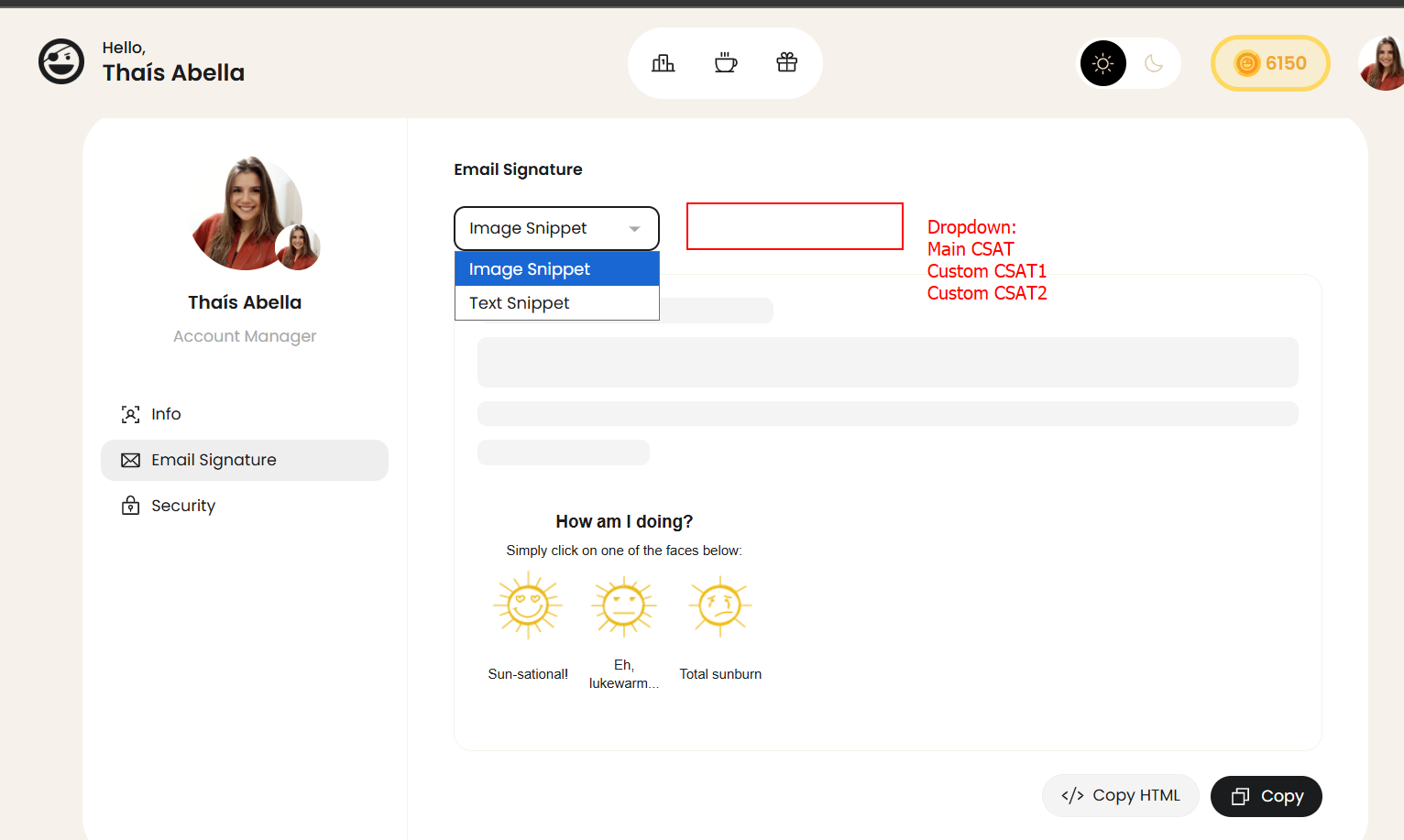
Dropdown in the Signature Copy Section:
Let the user choose their CSAT (Main CSAT, Sales Custom CSAT, AM Custom CSAT) via a dropdown.
This selection will generate a version to copy the images with links that already have the custom code that work in software like Outlook.
Why It Matters:
Most customers use Outlook, and we’re creating unnecessary friction for those trying to use a great feature.
Non-technical users (like Sales/AMs/Execs) are the ones who benefit the most from signature surveys but face the most difficulty.
This small change can significantly increase adoption of signature surveys and improve CSAT tracking accuracy for key users.
Share update with 0 linked conversations as well
Feature Request
About 1 year ago
Subscribe to post
Get notified by email when there are changes.
Feature Request
About 1 year ago
Subscribe to post
Get notified by email when there are changes.